Verifier
Setting up OID4VP verification
Configure your tenant as a verifier, define what you want to ask for, and accept presentations.
OpenID for Verifiable Presentations (OID4VP) is how Cyfher asks a holder’s wallet for specific credentials and cryptographically verifies the response. This guide covers the tenant settings, the request shape, and what you get back.
Cyfher implements OID4VP 1.0 with DCQL as the credential query language — the section references throughout this page are to the 1.0 specification. Some accept-side tolerance for implementer’s-draft-3 wallets remains (an ID3-era vp_token carrying a single presentation string rather than an array is still accepted), but the request side, the enforcement rules and the response contract are all 1.0. The wallet also accepts Presentation Exchange 2.0 from legacy issuers, but verifiers should prefer DCQL.
Prerequisites
- An active tenant.
- At least one active signing key on your tenant. The signing key’s certificate determines the verifier
client_idadvertised to the wallet:- Key with an x509 certificate →
client_id = x509_san_dns:<hostname-from-cert>. - Key without a certificate →
client_id = redirect_uri:<your-callback-url>.
- Key with an x509 certificate →
If you have no active signing key when you call the verifier API, you’ll get error: "no_signing_key" back.
Verification settings
Portal sidebar → Verification. Three things to configure:
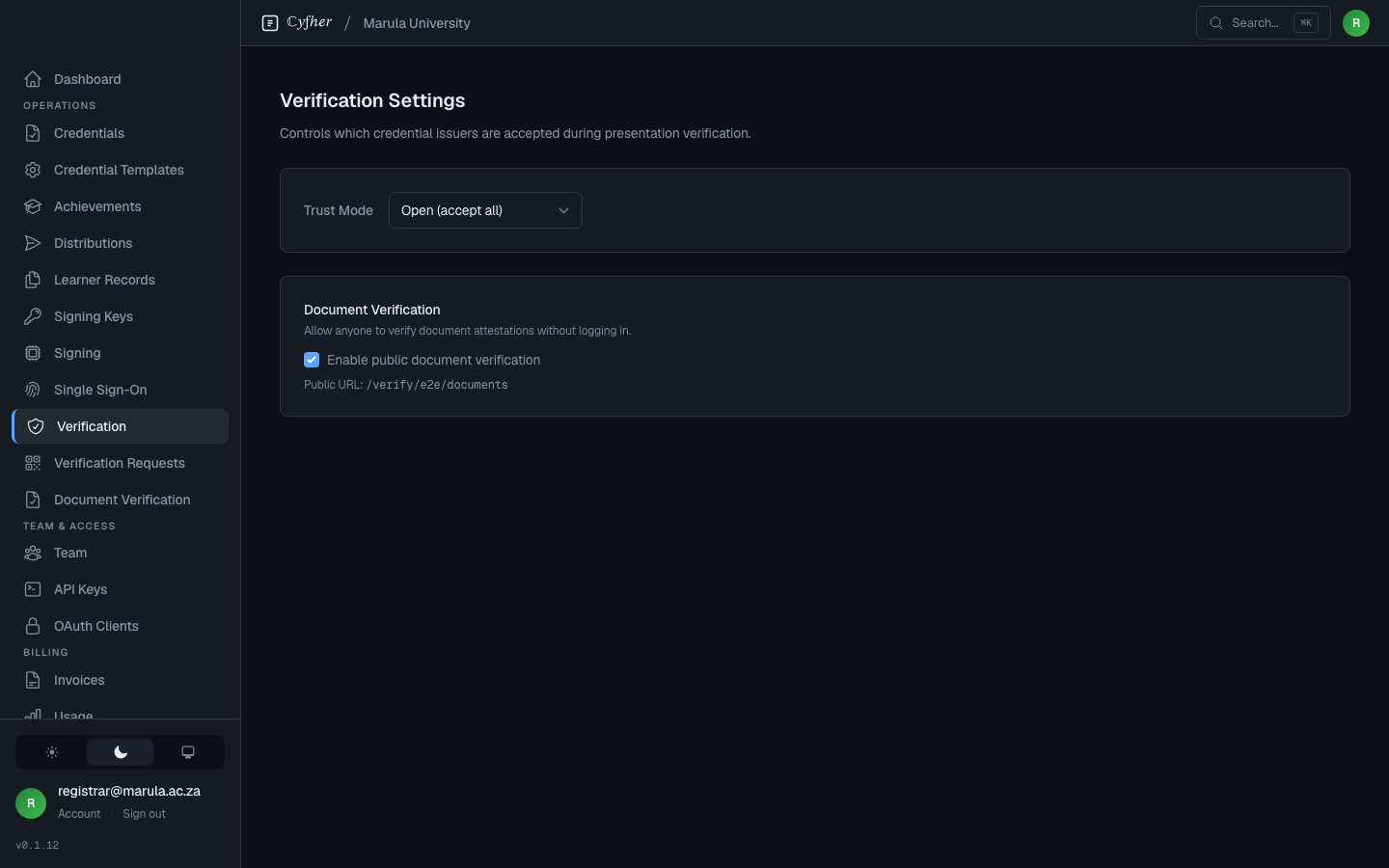
Trust Mode
Controls which issuers your verifier accepts presentations from:
- Open — any cryptographically valid presentation is accepted. Trust decisions happen in your application.
- Allowlist — only accept presentations signed by issuers on your trusted list. Anyone else is rejected at the verifier.
- Denylist — accept anyone except issuers on your blocked list.
- Federation — accept any issuer whose OpenID Federation trust chain resolves to a trust anchor you’ve selected. Cyfher walks the chain at verification time and verifies the presentation with the chain-resolved keys.
In Allowlist and Denylist mode, you list issuer identifiers (DIDs or HTTPS issuer URLs) one per row. Matching is exact on the credential’s issuer identifier — no trust-chain resolution happens in these modes, so a federation trust anchor entered here would only match a credential whose iss is literally that anchor.
In Federation mode, you pick one or more trust anchors from the platform registry (a platform administrator registers them under Admin → Trust Anchors). At verification time Cyfher resolves each presenting issuer’s OpenID Federation trust chain against those anchors and rejects any issuer whose chain doesn’t lead to a selected anchor. Federation mode rejects every issuer until at least one anchor is selected.
Public document verification
A toggle that enables a public verification page where third parties can drop in a signed document and see whether it verifies against your trust list — a shareable link you’ll find on the verification settings screen. Useful for offering a zero-integration verification UX to relying parties.
Creating a presentation request
You can also create a request without touching the API: Portal → Verification Requests builds the DCQL query, signs the request, and renders the openid4vp:// URI as a scannable QR. The form lets you mark each claim required or optional. Optional claims are emitted as a preferred claim_sets combination: a wallet holding them returns them, and one that does not falls back to the required-only combination and still satisfies the request.
Requires a tenant API key with the verifications:write scope (X-API-Key header). Create one under Portal → API Keys. The wallet-facing endpoints that follow the request (the signed request fetch, the response post and the result page) stay public, because wallets call them without any tenant credential.
POST /t/:slug/presentation/request

{
  "credential_type": "DriversLicense"
}
Or, for full DCQL control:
POST /t/:slug/presentation/request

{
  "dcql_query": {
    "credentials": [
      {
        "id": "drivers_license",
        "format": "mso_mdoc",
        "meta": { "doctype_value": "org.iso.18013.5.1.mDL" },
        "claims": [
          { "path": ["org.iso.18013.5.1", "given_name"] },
          { "path": ["org.iso.18013.5.1", "family_name"] },
          { "path": ["org.iso.18013.5.1", "birth_date"] }
        ]
      }
    ]
  }
}
Response:
{
  "uri": "openid4vp://?client_id=…&request_uri=…",
  "client_id": "x509_san_dns:verifier.example.com",
  "request_uri": "https://verifier.example.com/t/<slug>/presentation/authorize/<id>",
  "state": "<opaque-correlation-token>"
}
Render uri as a QR code for cross-device flow, or open it directly with window.location for same-device flow where the wallet handles the openid4vp:// scheme. The state is your correlation handle — save it.
What happens next
- Wallet fetches the signed authorization request from
request_uri(Cyfher serves it with content typeapplication/oauth-authz-req+jwt). - The holder reviews what’s being requested and consents in the wallet.
- The wallet posts the verified presentation token to
POST /t/:slug/presentation/responsewith yourstate. - Cyfher verifies the signature, status list, trust chain, and claim integrity, then records the result.
You learn the outcome by either:
- Watching the live result panel — when you mint the request from Portal → Verification Requests, the page subscribes to that request and swaps the QR for a result panel the moment the holder presents: it shows Verified / Verified (partial) / Verification failed / Declined by holder, plus one row per presented credential (the query it answered, its format, issuer, credential status and whether it was holder-bound) and, on failure or decline, the reason — for a failure, also which query’s presentation failed. Disclosed claim values are delivered to the holder’s wallet and are not stored here — the panel reports the outcome only.
- Watching the portal Audit Log — every verification also lands at Portal → Audit Log as a
presentation.verified(orpresentation.failed, orpresentation.declined) event, including which tenant’s credential was presented. The audit log is the durable record; the live panel is the same signal shown in real time. - Fetching the result behind the redirect — when your application drives the wallet leg and posts the VP token itself,
POST /t/:slug/presentation/responsereturnsHTTP 200 {"redirect_uri": "https://…/t/:slug/presentation/result/<token>"}and nothing else — OID4VP 1.0 §8.2 restricts thedirect_postresponse body toredirect_urialone, so the verdict is never inlined in that response.GETthe returned URL to get the verdict:verified: truewithholder_boundand apresentationsarray carrying one status-only entry per presented credential —query_id(the DCQL credential query it answered),format(sd_jwt_vc,w3c_vp,w3c_vcormdoc),issuer,verified,holder_boundand thestatus_check— on success; orverified: falsewith anerrorcode on a negative verdict (a revoked credential, an untrusted issuer, and similar), wherepresentationslists the entries evaluated up to and including the failing one (verified: falseplus the sameerror) and later presentations were not evaluated. The verdict never carries claim values or credential contents — the wallet already holds them, and a leaked result URL must disclose nothing about the holder. Both areHTTP 200, since the exchange itself succeeded either way. A holder who refuses the request instead of answering it (OID4VP 1.0 §8.5) produces a third shape:verified: false, declined: true, witherrorset toaccess_denied(holder declined, or had nothing to present) orinvalid_request(the wallet rejected the request as malformed), pluserror_descriptionwhen the wallet sent one — alsoHTTP 200. A presentation that does not satisfy the credential query it was filed under (the wrongvct, type or claim value for that query) is not a verdict either: it is a400 invalid_requestprotocol fault, since OID4VP 1.0 §6.4.2 forbids the wallet from returning it at all. The endpoint content-negotiates:Accept: application/jsongets you the JSON body above; a same-device browser following the link withAccept: text/htmlgets a small rendered result page instead. The token is single-tenant-scoped and expires 10 minutes after the presentation — after that (or for an unknown token) the endpoint returnsHTTP 404 {"error": "result_not_found"}. A genuine protocol fault (a malformed or expired request, avp_tokenthat doesn’t parse) is different from a verdict: it comes back directly fromPOST /t/:slug/presentation/responseasHTTP 400with{"error": "…", "error_description": "…"}and noverifiedkey at all, because there’s no verdict to report — the request itself was broken. Thestateis your correlation handle for both cases. - Subscribing via the result webhook — configure an HTTPS endpoint under Portal → Verification → Result webhook and Cyfher POSTs every presentation-verification outcome to it as it happens. See below.
Result webhook
Configure it at Portal → Verification (the Verification Settings page), in the Result
webhook panel: set the endpoint URL, toggle Enabled, and save. The first save generates a
signing secret and shows it to you once — store it, since it can only be rotated afterwards, not
retrieved again. Use Rotate secret to issue a new one (the old secret stops working
immediately) and Send test event to fire a synthetic presentation.verified delivery at your
endpoint. Recent deliveries, their status, response code, attempt count, and last error are listed
on the same page.
Payload. Cyfher POSTs a JSON body for every terminal outcome (verified, partial, or failed):
{
  "event": "presentation.verified",
  "verification_state": "<the state/request id you correlated the request with>",
  "status": "verified",
  "tenant": "<your-tenant-slug>",
  "occurred_at": "2026-07-25T12:34:56.000000Z",
  "data": {
    "holder_bound": true,
    "presentations": [
      {
        "query_id": "pid",
        "format": "sd_jwt_vc",
        "issuer": "https://issuer.example",
        "credential_status": "valid",
        "holder_bound": true
      }
    ]
  }
}
event is one of presentation.verified, presentation.verified_partial, presentation.failed,
or presentation.declined; status mirrors it as verified, verified_partial, failed, or
declined. data carries outcome-specific metadata: on success, holder_bound (true only when
every presentation carried a holder-binding proof) and presentations — one entry per presented
credential with query_id, format, issuer, credential_status and holder_bound; on failure
(including partial), a reason (and sometimes a detail) describing what went wrong, plus
query_id when one presentation is to blame; on a decline, error (access_denied or
invalid_request) and, when the wallet sent one, error_description. Claim values never appear
in data.
Headers. Each delivery carries:
X-Cyfher-Event— the event name (same value as theeventfield).X-Cyfher-Delivery— a UUID unique to this delivery attempt sequence, for idempotency/dedup.X-Cyfher-Signature—t=<unix-timestamp>,v1=<hex-hmac>, see below.
Verifying the signature. The signature is an HMAC-SHA256 over the timestamp and the raw request body, keyed on your tenant’s signing secret — the same shape Stripe uses:
signed  = "{t}.{raw_request_body}"
expected = hex( HMAC_SHA256(your_signing_secret, signed) )
# constant-time compare `expected` against the v1 value from the header;
# reject if |now - t| exceeds your tolerance (a few minutes is reasonable)
Retries. A 2xx response marks the delivery delivered. Anything else (non-2xx or a timeout)
is retried with exponential backoff, up to 6 attempts total, after which the delivery is marked
failed. Delivery status, response code, attempt count, and the last error are visible in the
portal delivery log described above.
Trust chain handling
For cross-tenant verification (a credential issued by another Cyfher tenant), Cyfher resolves the issuer’s metadata via the cross-tenant JWKS endpoint automatically — you don’t need to allow-list cross-tenant issuers individually, just the tenant or the platform federation root.
For external issuers without discoverable JWKS, Cyfher fails closed: with no way to fetch the issuer’s keys it cannot verify the signature, so the presentation is rejected. Because the request itself was valid — it’s the verification that came back negative — this is a verdict, not a protocol fault: POST /t/:slug/presentation/response still returns HTTP 200 {"redirect_uri": "…"}, and fetching that URL returns {"verified": false, "error": "jwks_fetch_failed"}. A presentation.failed event lands in the Audit Log either way. (A degraded HTTP-200 “partial verification” path exists only for the OID4VP conformance suite — it is opt-in under CONFORMANCE_SEED and is never enabled in production.)
Conformance
Cyfher passes the OID4VP ID3 verifier conformance suite (x509_san_dns profile, 45 SUCCESS test cases). Two items are deferred against the latest drafts:
- HAIP profile — High-Assurance Interoperability Profile (mandatory
x5cheader in JWT credentials, mandatoryexpclaim). Cyfher accepts presentations with or without these today; once HAIP stabilises, enforcement will be enabled per-tenant. - Format identifier transition — Cyfher issues and advertises
dc+sd-jwt(RFC 9901). The oldervc+sd-jwtidentifier is still accepted as an alias on the verification side, so wallets and issuers that have not moved yet keep working.
Full request/response schemas are in the API reference.